Blackletter display font with broad file compatibility
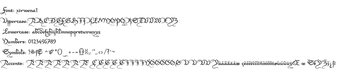
Xirwena by Xirwena is a stylized blackletter typeface that adds a gothic, medieval character to display text for designers and hobbyists. It renders sharp, angular strokes and high-contrast verticals for titles, posters, and branding, usable in any application that accepts system-installed fonts. The font includes full uppercase and lowercase sets, digits, punctuation, and clean vector outlines in standard .ttf/.otf files. Graphic designers, tabletop creators, and digital artists gain a handcrafted headline face for themed projects.
What does Xirwena change about desktop typography?
Xirwena is a blackletter display face that imposes a gothic, medieval voice on headings and titles. Its letterforms feature sharp, angular strokes, high-contrast verticals, and decorative terminals and flourishes that emphasize drama over continuous reading. Use cases include posters, book covers, branding, and tabletop graphics where short, emphatic text needs a historic or dark-fantasy tone rather than body copy.
How much typographic control does the font provide?
The font ships with complete uppercase and lowercase glyphs, numeric digits, and standard punctuation, allowing direct composition for headings and labels. Clean vector outlines permit scaling for high-resolution print and raster export without visible artifacts. Designers can adjust tracking and kerning in host applications and apply OpenType features where supported, though the release notes do not promise expanded alternates or extended typographic feature sets.
Does Xirwena work across platforms and applications?
Distributed as standard .ttf/.otf files, the font installs on Windows, macOS, and Linux and appears in Microsoft Office, Adobe Creative Cloud, and common text editors. For web deployment conversion to .woff or .woff2 is possible when the license allows embedding. The developer distributes the package through major font repositories, so designers can obtain the files and any accompanying readme or license documentation from those sources.
Is installing and using the font straightforward on a PC?
Installation follows a simple workflow: download the ZIP, extract the .ttf or .otf, then right-click and select Install on a PC. Once installed the font is available to any application that reads system fonts and does not introduce background processes. Users should inspect the included license or readme to confirm permitted commercial uses before embedding or redistributing the font.
A practical, specialized choice for themed headlines
Xirwena suits projects that need a historic or gothic tone; use it primarily for short, high-impact text and pair it with a neutral text face for longer passages. Test legibility at final sizes and convert files when embedding on the web. Treat the font as a stylistic accent in layouts rather than a running-text solution, and confirm licensing terms before wider distribution.
Pros
Sharp, decorative terminals that emphasize a gothic headline voice
Clean vector outlines for high-resolution printing and large-format use
Distributed as standard .ttf/.otf files for broad application compatibility
Cons
Limited extended Latin and accented glyph support in some versions
Commercial embedding requires checking the included license
Decorative letterforms reduce legibility at small sizes
Laws concerning the use of this software vary from country to country. We do not encourage or condone the use of this program if it is in violation of these laws. Softonic may receive a referral fee if you click or buy any of the products featured here.